
Agiler DVI-D to HDMI Cable 6ft For Sale Trinidad
1 in stock
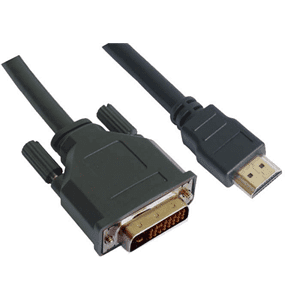
• 🔌 DVI-D (Male) to HDMI cable — 6 feet long
• 🖥️ Connect DVI-equipped computers or graphics cards to HDMI displays and monitors
• 📺 Supports high-definition video signal transmission
• 🔧 Plug-and-play — no drivers or adapters needed
• 💪 Durable construction for reliable, long-lasting connections
• 🇹🇹 Available in Trinidad and Tobago
UPC 4713621225887
$120.00 TTD $150.00 TTD
1 in stock
🤔 STUCK WITH A DVI PORT AND AN HDMI DISPLAY?
You’ve just upgraded your monitor or TV — it looks incredible. But then you check the back of your computer or graphics card and notice it only has a DVI-D port. Sound familiar? You’re not alone. Thousands of users hit this exact wall every day, and the frustration is real. The good news? The fix is simple, affordable, and right here.
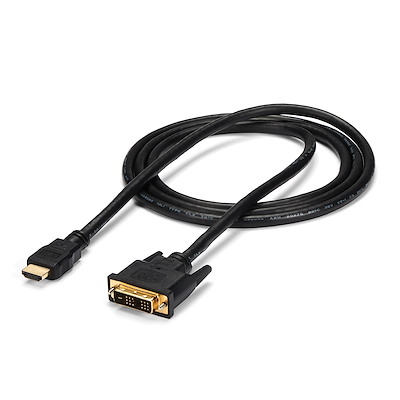
✨ THE PERFECT BRIDGE BETWEEN DVI AND HDMI
Introducing the Agiler DVI-D (Male) to HDMI Cable — 6 feet of pure connectivity freedom. No dongles. No bulky adapters falling out of ports. Just one clean cable that goes directly from your DVI-D source to your HDMI display. Whether you’re setting up a workstation, gaming rig, or office screen, this cable closes the gap between older DVI technology and modern HDMI displays — fast, clean, and hassle-free. Don’t let a port mismatch hold your setup back any longer.
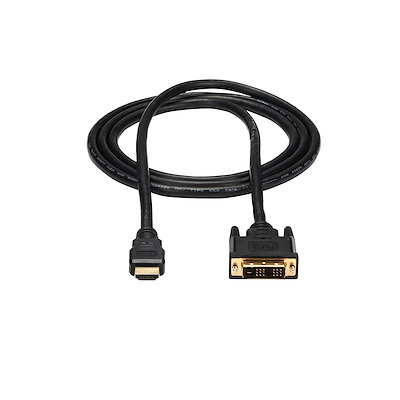
🔧 FEATURES & SPECIFICATIONS
— Cable Type: DVI-D Male to HDMI Male
— Cable Length: 6 Feet (approximately 1.8 metres)
— Signal: Transmits high-definition digital video
— Connector 1: DVI-D Male (24+1 pin)
— Connector 2: HDMI Male (Standard Type A)
— Note: Transmits video signal only (HDMI audio will not pass through DVI-D)
— Plug-and-play: No software or drivers required
— Durable construction with moulded strain-relief connectors
— Compatible with computers, graphics cards, laptops with DVI-D output, and HDMI monitors, TVs, and projectors
— Brand: Agiler

📖 HOW TO USE THIS CABLE
Using this cable couldn’t be simpler:
Step 1 — Power off your devices before connecting (recommended for safety).
Step 2 — Plug the DVI-D Male connector into the DVI-D output port on your computer, graphics card, or source device.
Step 3 — Plug the HDMI Male connector into any available HDMI input port on your monitor, TV, or projector.
Step 4 — Power on your devices. Your display should detect the signal automatically.
Step 5 — If needed, use your monitor or TV’s input selector to switch to the correct HDMI channel.
That’s it — no software, no configuration, no headaches. Perfect for home offices, classrooms, conference rooms, gaming setups, and more.
💡 BENEFITS & SOLUTIONS
✅ Eliminate the need for multiple adapters or conversion boxes — one cable does the job
✅ Save money by keeping your existing DVI-D hardware instead of replacing it
✅ Achieve a clean, clutter-free desk setup with a single direct-connect cable
✅ Ideal for IT professionals, home users, gamers, and office environments
✅ Extend the life of your existing monitor or computer investment
✅ Great for dual-monitor setups where one port is DVI-D and the other is HDMI
✅ Peace of mind with a reliable brand trusted by IT professionals across the Caribbean
❓ FREQUENTLY ASKED QUESTIONS
Q: Will this cable carry audio as well as video?
A: No. DVI-D does not support audio, so this cable transmits video only. For audio, you will need a separate audio cable connected to your speakers or audio device.
Q: What resolution does this cable support?
A: It supports high-definition digital video. For specific resolution requirements for your setup, WhatsApp us at 868-356-1030 and we’ll confirm for your setup.
Q: Can I use this cable to connect my PC to a TV?
A: Yes! As long as your PC has a DVI-D output port and your TV has an HDMI input, this cable will work perfectly to display your PC screen on the TV.
Q: Is this truly plug-and-play or do I need to install drivers?
A: It is completely plug-and-play. No drivers or software installation is needed — just connect and go.
Q: What’s included in the box?
A: The package includes the 6-foot DVI-D Male to HDMI Male cable. No additional accessories are included.
🇹🇹 WHY BUY FROM IT PLUS TRINIDAD AND TOBAGO
Finding quality cables and connectivity accessories locally in Trinidad and Tobago used to mean long waits, overpriced imports, or items that never arrive. IT Plus Trinidad changes that. We stock genuine Agiler products right here in T&T, so you get affordable pricing, fast delivery throughout Trinidad and Tobago, and the confidence of buying from a trusted local IT supplier. No overseas shipping delays. No customs surprises. Just reliable tech, locally available, when you need it.
📞 ORDER NOW — IT’S EASY!
Ready to sort out your connectivity? Ordering from IT Plus Trinidad is simple:
📧 Email us: [email protected]
💬 WhatsApp us: 868-356-1030
🏦 Online banking available for convenient payment
🚚 Delivery available throughout Trinidad and Tobago
Message us today and get your DVI-D to HDMI cable delivered straight to your door. Our team is friendly, knowledgeable, and ready to help you find exactly what you need!
Related products
-
Cables, CAT 5E Cables
Agiler CAT 5E Patch Cord Cable 50 Ft For Sale Trinidad
Product Description
An ideal solution for your cabling needs is here! Agiler is has always increasing cabling solutions for you. This 50-Foot Cat5e Patch Cable promises you a molded, snag-free boot that helps prevent unwanted cable snags. With this cable you’re always certain to have an excellent performing cable that is applicable to all your cable dilemmas. This 50-Foot Cat5e Patch Cables are specially manufactured to hold bandwidth demanding applications for up to 350 Mhz. These cables meet all Cat5e TIA/EIA standards so you don’t have to worry about its dependability
SKU: AGI-1404 -
Cables, HDMI Cables
15ft 4K Ultra HD HDMI Ultra High Difinition Cable For Sale Trinidad
🔌 15ft (approx. 4.5m) High-Speed HDMI Cable
📺 Supports 4K Ultra HD Resolution for crystal-clear picture quality
🎮 Compatible with TVs, gaming consoles, laptops, monitors, and projectors
⚡ High-speed data transmission with minimal signal loss
🔒 Secure, snug-fitting connectors for a stable, reliable connection
🎵 Supports HD audio including Dolby and DTS surround sound
📦 Available in Trinidad and Tobago — order today!UPC 728662221792
• UPC Code: 728662221792
SKU: n/a -
Cables, HDMI Cables
Unno Tekno HDMI Cable 25ft For Sale Trinidad
Product Description
Enjoy your favorite shows and movies with our affordable line of HDMI cables. Easy connect your TV, game console or Blu-Ray player and simplify those messy connections. Elevate your experience with an impressive full HD resolution and astonishing surround sound.
- HDMI V1.4.
- Supports full HD 1080p resolution.
- Compatible with most common 3D formats.
- High-speed data channel embedded.
- Audio return channel embedded.
- 25 ft length.
- UPC Code: 728662221815
SKU: n/a