
-
×
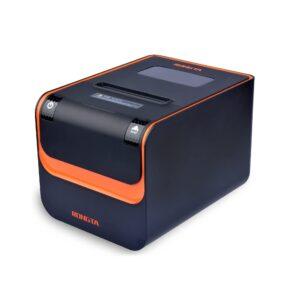 Rongta POS Printer, 80mm Direct Thermal Receipt Printer with Auto Cutter, USB Serial Ethernet Interface, Support Windows/Mac/Linx Cash Drawer
1 × $1,395.00 TTD
Rongta POS Printer, 80mm Direct Thermal Receipt Printer with Auto Cutter, USB Serial Ethernet Interface, Support Windows/Mac/Linx Cash Drawer
1 × $1,395.00 TTD
Subtotal: $1,395.00 TTD
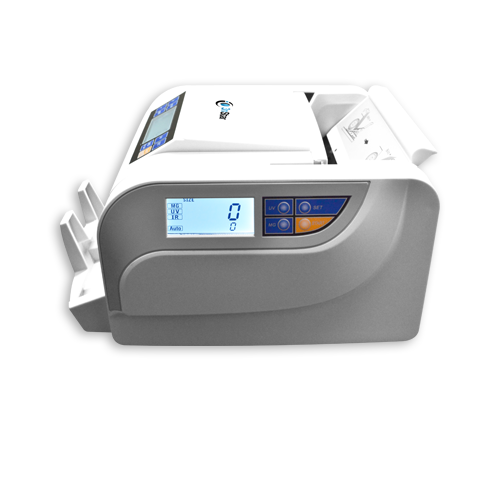
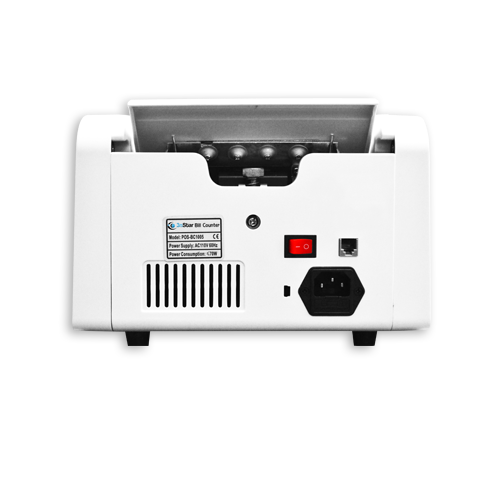

10 in stock
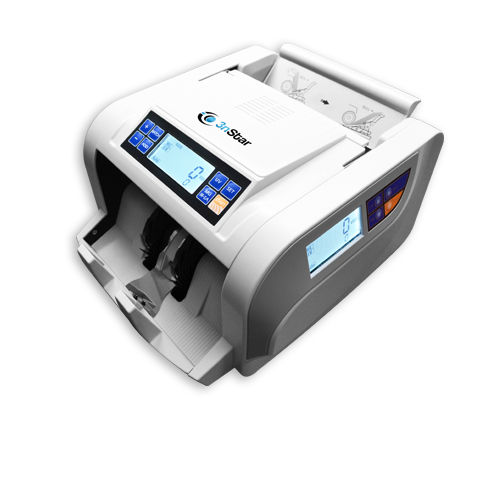
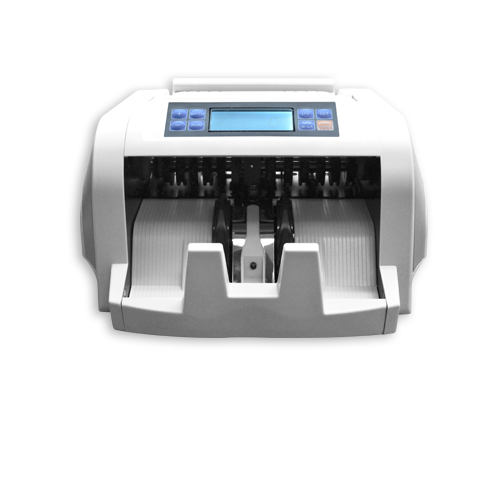
💵 3nStar BC1005 Professional Bill Counter – Trinidad & Tobago
✅ Lightning-Fast Counting – Counts up to 1,000 bills per minute
✅ TTD Pre-Configured – Ready to use with Trinidad and Tobago Dollar (TTD) notes
✅ Dual UV + Magnetic Detection – Advanced counterfeit protection keeps your business safe
✅ Handles Paper & Polymer Bills – Counts modern polymer and traditional paper currency
✅ 3 Digital Displays – Includes external customer-facing screen for transparency
✅ Automatic Error Detection – Catches double bills, half notes, chain bills instantly
✅ Batch Counting Mode – Organize cash into preset bundles (0-300 bills)
✅ Large Capacity – 300-bill hopper, 200-bill stacker for high-volume operations
✅ Plug & Play – No complicated setup – turn on and start counting
🏪 Perfect For: Retail stores, supermarkets, restaurants, bars, gas stations, pharmacies, banks, small businesses across Trinidad and Tobago
💼 Save Time. Reduce Errors. Protect Your Profits.
📞 Order Now: WhatsApp (868) 356-1030 or purchase directly on itplustrinidad.com
🚚 Island-Wide Delivery – Fast delivery throughout Trinidad & Tobago
💳 Easy Payment – Online banking, payment links, cash on delivery available
Model: 3nStar BC1005
Brand: 3nStar
Voltage: 110V, 60Hz
UPC
$1,750.00 TTD
10 in stock
Are you tired of spending hours manually counting cash at the end of each business day? Do you worry about counterfeit bills slipping through and costing your business money? The 3nStar BC1005 Professional Bill Counter is your complete solution for fast, accurate, and secure cash management – specifically optimized for Trinidad and Tobago currency (TTD).
In today’s fast-paced business environment, time is money. Whether you’re running a busy retail store in Port of Spain, managing a restaurant in San Fernando, operating a gas station in Chaguanas, or handling daily cash at a pharmacy in Arima, manual cash counting is costing you valuable time and exposing you to errors. The 3nStar BC1005 eliminates these problems while protecting your business from counterfeit currency.
Count up to 1,000 bills per minute – what used to take 20-30 minutes of manual counting now takes less than 2 minutes. Close your register faster, get home earlier, and free up your staff to focus on customer service instead of tedious cash counting.
Protect your business with dual UV (ultraviolet) sensors and magnetic (MG) detection technology. The machine automatically scans every bill for authenticity, immediately alerting you to suspicious notes. In Trinidad and Tobago where counterfeit TTD bills are a real concern, this feature alone can save you thousands of dollars in losses.
Unlike generic money counters, the 3nStar BC1005 comes ready to use with Trinidad and Tobago Dollars right out of the box. Simply:
No complicated programming. No technical setup.
Trinidad and Tobago has transitioned to polymer bills, and this machine handles them perfectly. Whether you’re counting older paper currency or newer polymer notes, the BC1005 processes both with equal accuracy.
The BC1005 features 3 LCD screens:
The machine automatically catches:
No more human counting errors. No more miscounts. No more losses.
Perfect for end-of-day reconciliation, deposit preparation, or organizing cash for banking.
Problem #1: “Closing my register takes too long”
Solution: Count $50,000 TTD in less than 5 minutes instead of 30+ minutes manually. Get home to your family faster.
Problem #2: “I keep finding counting errors”
Solution: Eliminate human error completely. The BC1005 is 99.9% accurate, ensuring your cash drawer always balances.
Problem #3: “I’m worried about accepting fake bills”
Solution: UV and magnetic detection catch counterfeits instantly, protecting your profit margins from fraud.
Problem #4: “My staff doesn’t like counting cash”
Solution: Make cash handling easy and stress-free. Staff morale improves when tedious tasks are automated.
Problem #5: “I need to organize cash for the bank”
Solution: Use batch mode to organize bills into standard bundles (e.g., 100 bills at a time) for quick bank deposits.
✅ Retail Stores & Supermarkets – Process daily sales faster and more accurately
✅ Restaurants & Bars – Count tips, cash sales, and receipts in minutes
✅ Gas Stations – Handle high cash volumes with ease
✅ Pharmacies – Secure, fast cash reconciliation
✅ Banks & Credit Unions – Professional-grade counting for teller operations
✅ Event Venues – Count ticket sales and concession revenue quickly
✅ Small Businesses – Any cash-intensive operation benefits from automation
| Feature | Details |
|---|---|
| Model | 3nStar BC1005 |
| Counting Speed | 1,000 bills per minute |
| Hopper Capacity | 300 bills |
| Stacker Capacity | 200 bills |
| Counterfeit Detection | 2x UV (Ultraviolet) + 1x MG (Magnetic) |
| Bill Types | Paper and Polymer currency |
| Bill Width Range | 50-110mm |
| Bill Length Range | 90-180mm |
| Bill Thickness Range | 0.075-0.15mm |
| Dimensions | 295mm (H) x 240mm (W) x 300mm (D) |
| Weight | 5.7 kg |
| Power Supply | 110V, 60Hz, 70W |
| Operating Temperature | 0°C – 40°C |
| Display | 3 LCD screens (2 integrated + 1 external) |
| Batch Mode | 0-300 bills (increments of 5) |
| Functions | Auto start/stop, batch counting, add mode, error detection |
Step 1: Plug in the machine and turn it on
Step 2: Press the MG/IR button once (optimizes for TTD bills)
Step 3: Load up to 300 bills into the rear hopper
Step 4: Machine automatically starts counting
Step 5: Review the count on the digital display
That’s it! No training required. No technical knowledge needed.
Peace of Mind – Know your cash count is 100% accurate every single time
Time Freedom – Spend less time counting, more time growing your business
Security – Sleep better knowing counterfeit bills won’t slip past you
Professional Image – Show customers and staff you run a modern, efficient operation
Return on Investment – Pay for itself within months through time savings and error prevention
Ready to upgrade your cash handling? Ordering is simple:
✅ Island-Wide Delivery – We deliver to every corner of Trinidad and Tobago
✅ Secure Packaging – Your machine arrives safely and ready to use
✅ Customer Support – Phone and email support available
✅ Troubleshooting Guide – Comprehensive error code guide included (see product page for complete manual)
Q: Does this work with Trinidad and Tobago Dollars (TTD)?
A: Yes! It’s pre-configured for TTD and handles both polymer and paper bills.
Q: Can it detect counterfeit TTD bills?
A: Yes, the dual UV sensors and magnetic detection catch fake bills automatically.
Q: How long does counting take?
A: Up to 1,000 bills per minute – a full day’s sales can be counted in under 5 minutes.
Q: Is it difficult to use?
A: No! Simply turn it on, load bills, and it automatically starts counting. No training required.
Q: What if the machine jams?
A: The comprehensive troubleshooting guide (included on the product page) walks you through all error codes and fixes.
Every day you delay is another day of:
Order your 3nStar BC1005 Bill Counter today and join hundreds of Trinidad and Tobago businesses that have already upgraded their cash handling systems.
📞 Call/WhatsApp: (868) 356-1030 or 777-6299
🌐 Order Online: itplustrinidad.com
Located at: #1 Canary Street, Esperance Village, San Fernando, Trinidad
For your convenience, we’ve included a comprehensive troubleshooting guide with all error codes and solutions. See the complete guide on the product page to ensure you can quickly resolve any issues and keep your business running smoothly.
Common Error Codes:
Each error code includes: ✓ What it means
✓ Why it happens
✓ Step-by-step solutions
✓ Prevention tips
✅ Trusted Local Supplier – Serving Trinidad and Tobago for years
✅ Quality Products – We only stock reliable, tested equipment
✅ Competitive Pricing – Best value for professional-grade equipment
✅ Expert Support – Knowledgeable team ready to help
✅ Fast Delivery – Island-wide shipping
✅ Customer Satisfaction – Your success is our priority
Make the smart choice for your business. Order your 3nStar BC1005 Bill Counter today!
| Size and Weight |
Height: 295mmWidth: 240mmDepth: 300mmWeight: 5.7Kg.
|
|---|---|
| Automatic half-bill, double-bill, chain bill detection |
Yes
|
| Automatic starting, stopping and clearing |
Yes
|
| Batching and adding and self-examination functions |
Yes
|
| Includes external display |
Yes
|
| Counting Speed |
1000 bills/min
|
| Hopper Capacity |
300 pcs
|
| Stacker Capacity |
200 pcs
|
| Bill size limited (Width) |
50-110mm
|
| Bill size limited (Length) |
90-180mm
|
| Bill thickness range |
0.075~0.15mm
|
| Power Supply |
110V/220V, 60Hz/50Hz
|
| Master Carton Size |
624mm * 387mm * 275mm (2pcs)
|
| Gross Weight (kg.) |
14 Kgs (2pcs)
|
🧾 3nStar Bill Counter for Sale in Trinidad – Fast, Accurate & TTD-Ready
Looking for a reliable bill counter in Trinidad? The 3nStar Bill Counter is your go-to solution for fast, accurate cash counting — perfect for retail stores, offices, and hospitality businesses across Trinidad and Tobago.
✅ Pre-Configured for Trinidad and Tobago Currency (TTD)
No setup required! This machine comes ready to use out of the box, with settings optimized for TTD banknotes. Here’s how to get started:
🔧 Key Features
🏪 Ideal for Businesses in Trinidad
Whether you’re managing daily sales at IT PLUS, handling guest payments at Rachel’s Retreat, or running a busy storefront, this bill counter saves time and reduces human error.
Buy the 3nStar Bill Counter in Trinidad today and enjoy fast, secure cash handling with zero guesswork. Available now at IT PLUS Trinidad.
@itpluslimited Money Counter Now on Sale @ITPlusLimited Purchase Online https://itplustrinidad.com/product/3nstar-bill-counter-for-sale-trinidad/ Contact Us 356-1030 / 777-6299
The 3nStar BC1005 is a professional bill counter that eliminates counting errors and drastically reduces the time spent counting cash. It counts bills while simultaneously detecting counterfeits using advanced multi-point technology.
Key Features:
Perfect For: Retail shops, convenience stores, small businesses, and any cash-intensive operations
Solutions:
Solutions:
Solutions:
Solutions:
Solutions:
What it means: Potential counterfeit detected via ultraviolet scanning
Common Causes:
Solutions:
What it means: Potential counterfeit detected via magnetic scanning
Common Causes:
Solutions:
What it means: Two bills are stuck together
Solutions:
What it means: Multiple bills are feeding through together in a chain
Solutions:
What it means: Bills are not feeding straight through the machine
Solutions:
What it means: Bill size doesn’t match expected dimensions
Solutions:
What it means: Torn, damaged, or incomplete bill detected
Solutions:
What it means: Paper jam or mechanical failure
Troubleshooting Steps:
Step 1: Check for Obstructions
Step 2: Check Big Motor
Step 3: Check Feeding Roller
Step 4: Check Small DC Motor
Step 5: Check Speed Sensor
To Access Settings: Press and hold the SET button for 5-6 seconds
1. MG Sensitivity
2. UV Sensitivity
3. IR Sensitivity
4. Size Sensitivity
5. Voice ON/OFF
6. Half Note Detection
7. Alarmed Note Counting
8. Batch Mode
9. Batch Quantity Reminder
10. Factory Reset
✓ Keep bills neat and aligned when loading into the hopper
✓ Fan or shuffle bills before counting to prevent sticking
✓ Don’t overload the hopper – stay within 300-bill capacity
✓ Clean feeding rollers regularly with a soft cloth
✓ Keep the machine away from direct sunlight and extreme temperatures
✓ Ensure proper ventilation around the unit during operation
✓ Remove jammed bills carefully to avoid damaging sensors

• IT Plus Code: OBK-R7-S3
• UPC Code: 070889007452
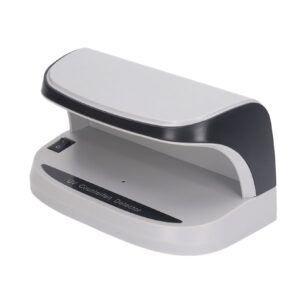
• UPC Code: r8s101
IT Plus Code: R8-S3-001